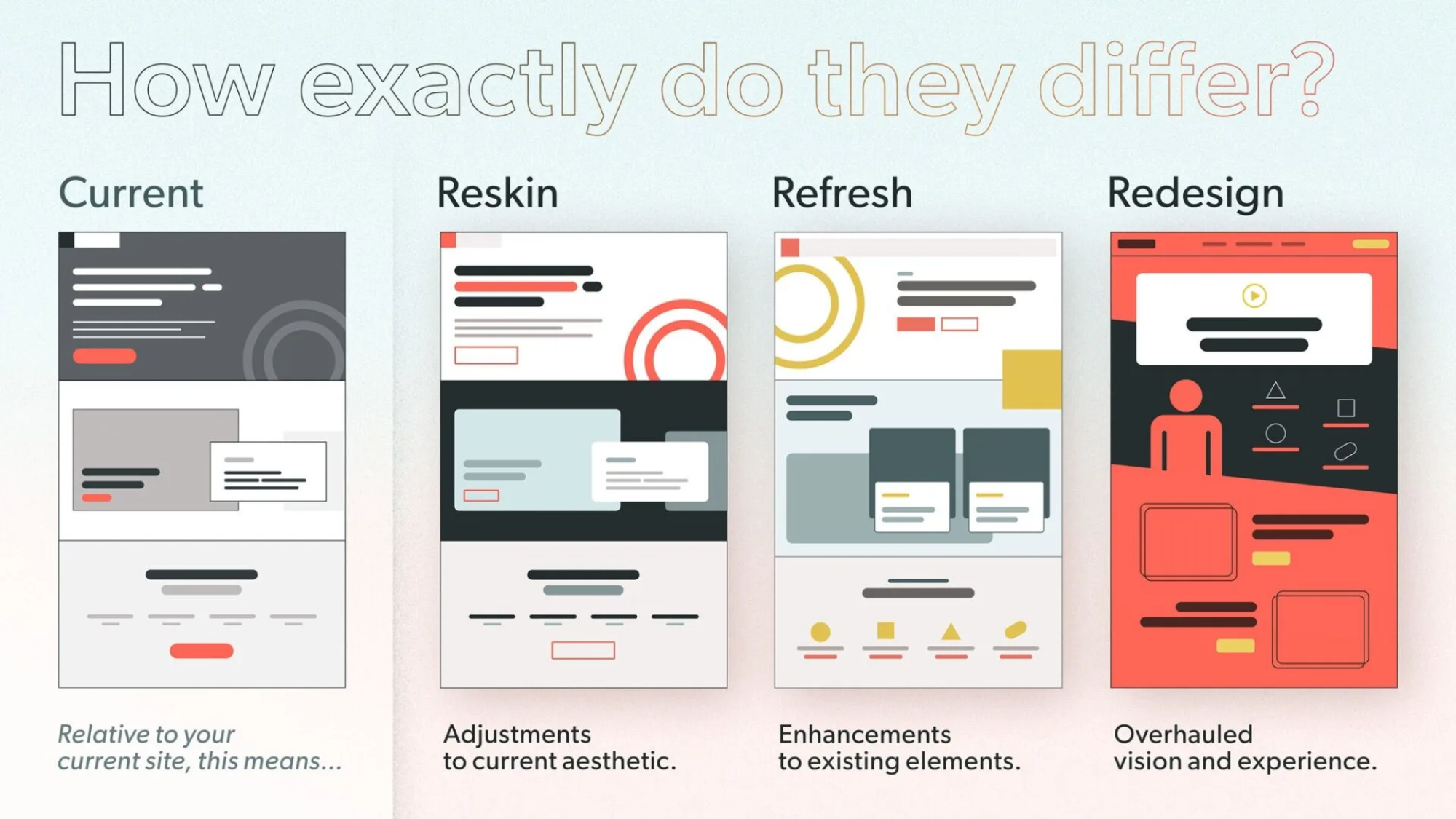
Have you ever looked at your website and thought, “This needs a change, but what kind?” You’re not alone. Many people get confused about terms like reskin, refresh, and redesign. They all sound similar, but they differ in big ways. Based on that graphic you shared, which shows a current site next to these three options, let’s dive in. The graphic asks, “How exactly do they differ?” and breaks it down simply. It compares the current version to reskin (adjustments to aesthetic), refresh (enhancements to elements), and redesign (overhauled vision and experience).
Why does this matter? If you’re running a blog, a shop, or any online space, picking the right update can save time and money. It can also boost how users feel about your site. What if you choose the wrong one? You might end up with a site that looks new but still feels old and clunky. Let’s explore each one step by step. By the end, you’ll have ideas on which might fit your needs. Ready to think about your own site? Let’s start with the basics.
Understanding Your Current Website
Before we jump into changes, let’s talk about the “current” state. The graphic shows it as the starting point: a basic layout with gray tones, simple boxes, and a red button. It’s like your site’s snapshot right now.
Why assess this first? Because any update builds on what you have. Ask yourself:
- Does your site load fast?
- Is it easy to navigate?
- Does it match your brand’s colors and feel?
If you’re happy with the core but want tweaks, you might not need a full overhaul. Suggesting a course of action: Grab a notebook and list what works and what doesn’t. This simple step can guide you. For example, if the layout is solid but colors feel dated, a small change might do the trick.
Now, let’s move to the first option: reskin.
What Is a Reskin?
A reskin is like giving your site a fresh coat of paint. The graphic calls it “adjustments to current aesthetic.” It keeps the same structure but tweaks colors, fonts, or images to make it look modern.
Why choose a reskin? It’s quick and cheap. Perfect if your site works well but looks old. Think of it as updating your wardrobe without buying new clothes—just accessorizing better.
Here are the key features of a reskin, in bullet points for quick reading:
- Changes visuals only: Swap colors, add new icons, or update fonts.
- Keeps layout the same: No moving menus or adding pages.
- Fast turnaround: Often done in days or weeks.
- Low cost: No need for big coding changes.
- Minimal disruption: Users won’t feel lost.
For instance, if your site has a dark gray theme like in the graphic, a reskin might switch to brighter reds and circles for a fun vibe. Have you noticed sites that suddenly look sharper without changing much? That’s often a reskin.
To see it in action, check this example of a website before and after a reskin-like update:
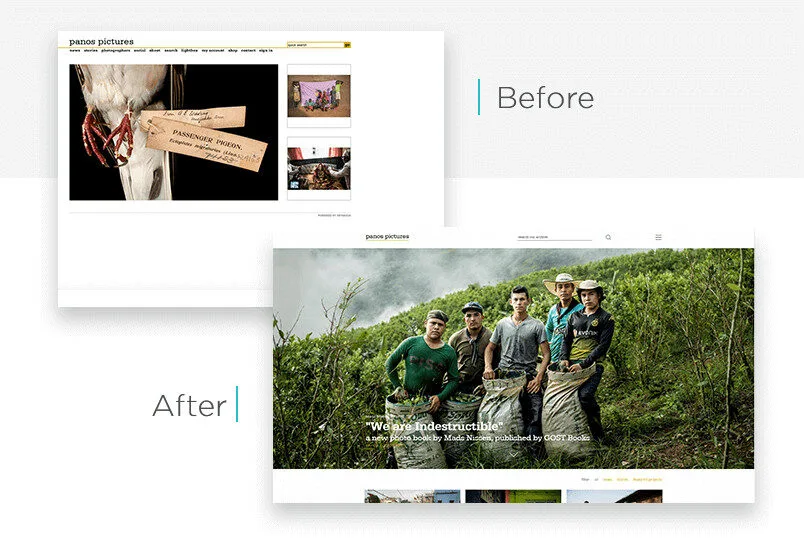
Wondering if this is for you? If your traffic is good but bounce rates are high due to outdated looks, try a reskin. Suggestion: Use free tools like Canva to mock up color changes and see how it feels.
What Is a Refresh?
Moving up a level, a refresh is about “enhancements to existing elements,” as the graphic says. It’s more than just looks—it’s improving what’s there without starting over.
What’s the appeal? A refresh fixes pain points while keeping the familiar feel. It’s like reorganizing your room: same furniture, but better arranged.
Key aspects in bullets:
- Builds on current setup: Add features like better search bars or mobile tweaks.
- Improves user experience: Make buttons bigger or add animations.
- Moderate effort: Takes weeks to months.
- Balances cost and impact: More than reskin, less than redesign.
- Keeps core identity: Your brand stays recognizable.
In the graphic, the refresh version adds yellow circles and cleaner lines to the gray base. It’s enhanced but still similar. Ever visited a site that added a chat feature or better images? That’s a refresh.
Here’s a visual example of a website before and after a refresh:
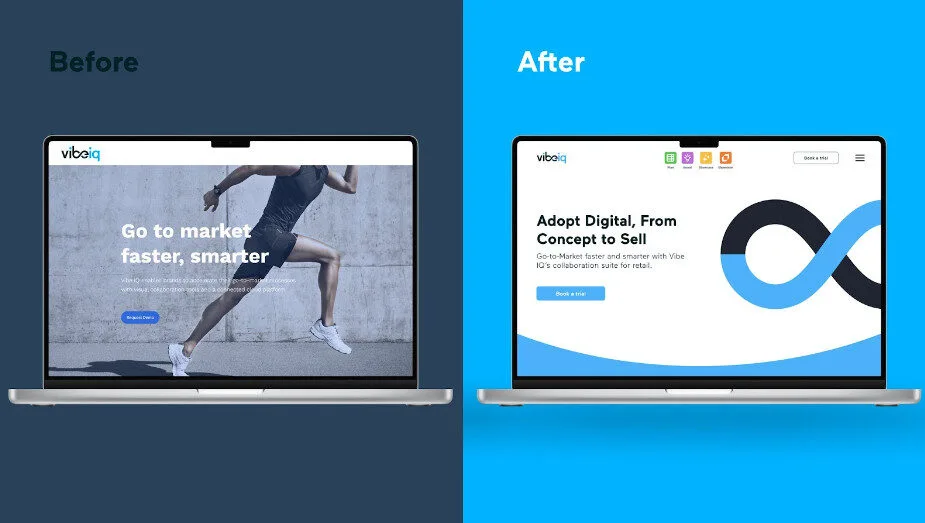
Are you dealing with user complaints about slow features? A refresh could help. Action idea: Survey your visitors with a quick poll—what one thing would they improve? Use that to plan your enhancements.
What Is a Redesign?
Now, for the big one: redesign. The graphic labels it as an “overhauled vision and experience.” This is a total makeover, rethinking everything from layout to purpose.
Why go this route? If your site no longer fits your goals, like if your business has grown, a redesign aligns it anew. It’s like building a new house instead of patching the old one.
Bullets for the main points:
- Complete overhaul: New structure, navigation, and features.
- Focuses on vision: Matches current trends and user needs.
- High effort: Months to plan and build.
- Bigger budget: Involves designers and developers.
- Fresh start: Can boost engagement a lot.
The graphic shows a bold red background with new icons and a video play button—totally different from the current gray. Sites like major brands do this every few years to stay relevant.
Take a look at this before-and-after redesign example:
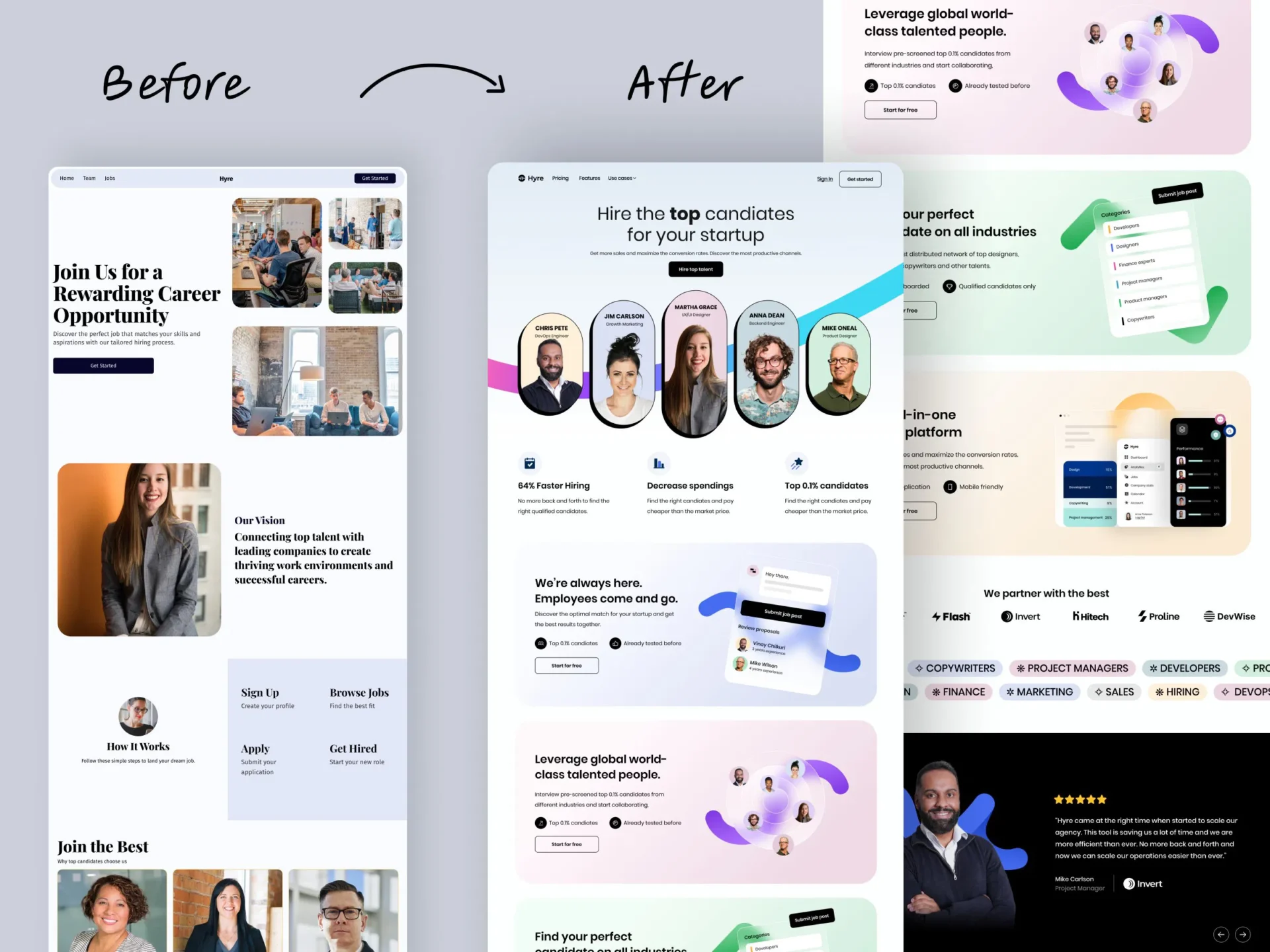
Is your site from five years ago and not mobile-friendly? Time for a redesign.
Suggestion: Hire a pro like us Kajabi-Experts. Start small by sketching your dream layout.
How Do They Compare Side by Side?
To make it clear, let’s compare them. The graphic puts them next to each other for a reason—it shows the progression from minor to major changes.
Use this table for a quick overview:
| Aspect | Reskin | Refresh | Redesign |
|---|---|---|---|
| Scope | Visual tweaks | Element improvements | Full overhaul |
| Time | Short | Medium | Long |
| Cost | Low | Moderate | High |
| Risk | Low | Medium | High |
| Impact | Subtle | Noticeable | Transformative |
What stands out to you here? If time is tight, reskin wins. But for big growth, redesign might be worth it.
Pros and cons in bullets for each:
Reskin Pros:
- Quick to implement.
- Keeps users comfortable.
Reskin Cons:
- Doesn’t fix deep issues.
- Might need more later.
Refresh Pros:
- Improves without chaos.
- Good value for effort.
Refresh Cons:
- May not solve all problems.
- Could feel patchwork.
Redesign Pros:
- Modernizes everything.
- Boosts long-term success.
Redesign Cons:
- Expensive and time-consuming.
- Risk of alienating users.
Have you weighed these for your site? Think about your goals—what’s your timeline and budget?
When to Choose Each One
Choosing depends on your situation. Ask: What’s wrong with my site? Is it just looks, or deeper?
- Pick reskin if: Your site functions well but looks tired. Great for small businesses on a budget.
- Go for refresh when: Users like the site but want better features. Ideal for growing sites.
- Opt for redesign if: Your brand has evolved, or the site is outdated tech-wise. Best for major shifts.
Real-world examples: A blog might reskin for a new season’s colors. An e-commerce site could refresh with better carts. A company rebranding? Full redesign.
Suggestion: Audit your site using free tools like Google PageSpeed. See what scores low and match it to these options.
Final Thoughts: What’s Next for Your Site?
We’ve covered how reskin, refresh, and redesign differ, straight from that graphic. Reskin adjusts aesthetics, refresh enhances elements, and redesign overhauls the vision. Each has its place.
But what about you? Are you ready to update? Start by evaluating your current site. Maybe try a small reskin first to test waters. Or, if you’re bold, plan a redesign. What changes excite you most? Share your thoughts—perhaps we can brainstorm more ideas. Remember, the right choice keeps your site fresh and users happy. Let’s make your online space shine!
Have a website thats not on Kajabi but still needs some design work? Visit our sister company SITE ORBIT. They specialize in platforms like WordPress, Squarespace, Wix, LearnDash, Showit and more