Reskin, Refresh, or Redesign? How to Pick the Right Update for Your Website
Three terms that sound similar, but each one costs different money, takes different time, and solves a different problem.
You look at your website and something feels off. It’s not broken. It’s just tired. So you start asking around, and people throw three words at you: reskin, refresh, redesign. They sound interchangeable. They’re not.
Pick the wrong one and you’ll spend money on a site that still feels old. Pick the right one and you can solve the actual problem with the smallest possible budget. Here’s how to tell which is which.

Start by Looking at What You Already Have
Before you change anything, get honest about your current site. Does it load fast? Is it easy to navigate? Does it actually look like your brand, or did it drift somewhere over the years?
Grab a notebook. Write down what works and what doesn’t. This sounds basic, but most people skip it and end up paying a designer to figure out something they could’ve answered in twenty minutes. The list you make is what tells you whether you need a coat of paint or a new building.
What Is a Reskin?
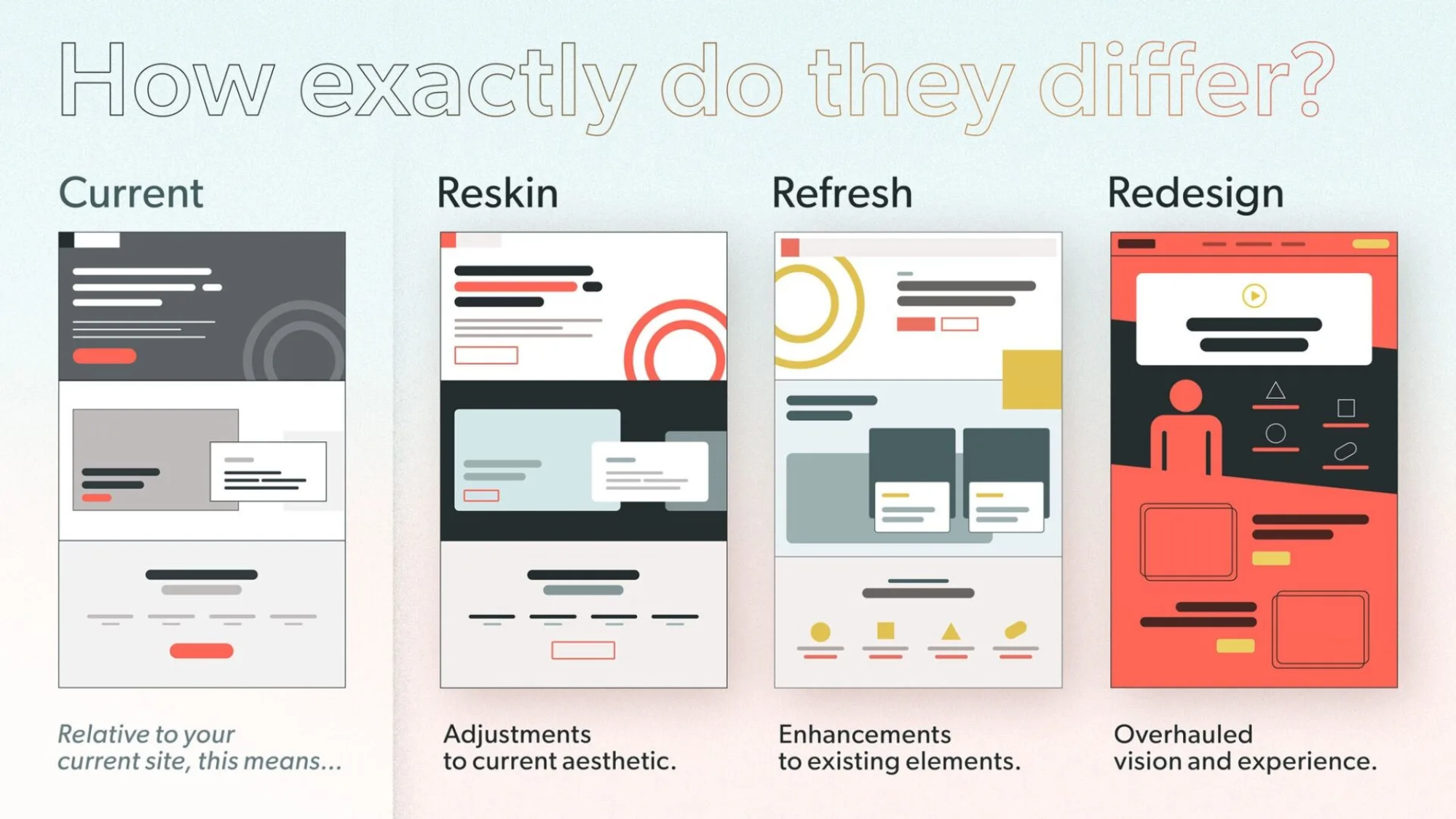
A reskin is a fresh coat of paint. Same structure, same pages, same buttons. New colors, new fonts, maybe new icons. The skeleton stays. Only the surface changes.
It’s the cheapest and fastest of the three. Days to weeks. No code rewrites. No moving menus. Users don’t have to relearn anything because nothing structural moved.
What a reskin includes
- New color palette and typography
- Updated icons, photography, and illustrations
- Same layout, navigation, and page structure
- Minimal coding changes
- Almost no disruption to existing users
If your site works fine but looks five years out of date, a reskin is probably enough. If your bounce rates are climbing and you suspect the visuals are the reason, this is the cheapest test you can run.

What Is a Refresh?
A refresh goes one level deeper. You’re not just changing how things look. You’re improving how they work. Better navigation. Faster pages. A smarter mobile layout. Maybe a new search bar or a chat widget. The brand identity stays recognizable, but the site feels noticeably better to use.
Think of it as reorganizing a room. The furniture’s the same, but it’s arranged in a way that actually makes sense.
What a refresh includes
- Visual updates plus functional improvements
- Better navigation, search, or mobile experience
- Performance and speed fixes
- New features added without rebuilding the foundation
- Brand identity stays intact
If your visitors complain about specific pain points (the menu, the checkout, slow images), a refresh fixes those without scrapping everything. Run a quick visitor poll: ask “what’s the one thing you’d change about this site?” The answers will write your refresh brief for you.

What Is a Redesign?
A redesign is the gut renovation. New structure, new navigation, often new strategy. You’re rethinking what the site is for, who it’s talking to, and what it needs to do, and then rebuilding from there.
Months of work. Designers, developers, sometimes a copywriter and a strategist. Big budget. Real risk. But if your business has changed and your site hasn’t, no amount of paint or rearranging fixes that. You need new bones.
What a redesign includes
- Complete overhaul of structure, navigation, and content
- New strategy aligned to current business goals
- Modern tech stack and mobile-first build
- Months of design and development work
- Significant budget and stakeholder involvement
Signs you need a redesign: the site is more than five years old, it’s not mobile-friendly, your business has pivoted, or the platform itself can’t do what you need anymore. If two or more of those are true, stop patching and start over.

A reskin changes how the site looks. A refresh changes how it works. A redesign changes what it is.
How They Compare, Side by Side
The simplest way to think about these three options is as a progression. Each one does more than the last, costs more than the last, and takes longer than the last.
| Aspect | Reskin | Refresh | Redesign |
|---|---|---|---|
| Scope | Visual tweaks only | Element improvements | Full overhaul |
| Timeline | Days to weeks | Weeks to months | Months |
| Cost | Low | Moderate | High |
| Risk | Low | Medium | High |
| Impact | Subtle | Noticeable | Transformative |
| Best for | Tired-looking sites that still work | Working sites with specific pain points | Sites that no longer match the business |
How to Pick the Right One
Don’t overthink this. Match your situation to one of these three.
- Reskin if your site functions fine but looks dated. Common for small businesses on a tight budget who just need to look modern again.
- Refresh if users like the site but you’ve identified specific things that frustrate them. Ideal for growing sites where the foundation is solid.
- Redesign if your brand has evolved, your goals have shifted, or the technology can’t keep up anymore. This is the right call when patching is just delaying the inevitable.
Real examples: a seasonal blog might reskin every year to match new colors. An online store might refresh the checkout flow when conversions drop. A company that’s just rebranded after an acquisition needs a full redesign.
Before you commit to anything, run your site through Google PageSpeed Insights and a mobile usability checker. The scores will tell you whether your problem is cosmetic, structural, or technical. That answer points you straight at the right option.
What’s Next
If you’re not sure which one fits, start with the cheapest test. A reskin is reversible. A redesign is not. Sketch out what bothers you about your current site, decide whether it’s a paint problem, a furniture problem, or a foundation problem, and pick accordingly.
If you’re on Kajabi and want help thinking it through, reach out to us. If your site lives somewhere else (WordPress, Squarespace, Wix, LearnDash, Showit), our sister company Site Orbit handles those platforms.